This has to be one of the most useful tricks in Apple’s latest operating system…
Simply press Shift / Command / 5 (⇧⌘5), and a new panel shows up offering you control of the screenshot process.
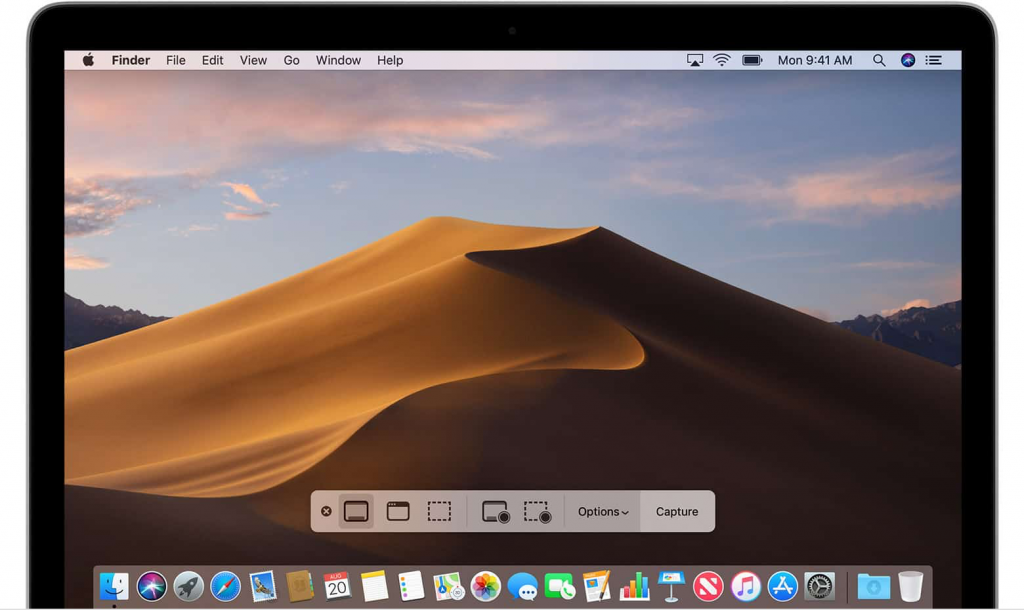 If you prefer to use keyboard commands to choose between available the screenshot modes.
Screenshot Commands
- Whole screen capture – Shift / Command / 3 (⇧⌘3).
- Single-window capture or – Shift / Command / 4( then press the Spacebar (⇧⌘4 then Spacebar).
- Capture a selection – Shift / Command / 4 then click and drag the crosshair cursor (⇧⌘4 then click and drag)
Finally, a really useful feature which resembles that of iOS: your freshly captured screenshot displays as a floating thumbnail in the bottom-right corner of the screen. Double-click the thumbnail and you can easily move the screenshot to another location – even the Trash if you’ve changed your mind. You can also utilise Markup tools to edit your screenshot. Cool, huh?

Mojave Screenshot:
The team at MacEmergency love this feature of macOS 10.14 Mojave and we are ready waiting to help you upgrade your Mac without running in to problems. Contact us with your specific needs and we’ll discuss the best solution – whether it’s one Mac or a hundred, we have the know-how and expertise to help you. In the meantime, would you like to know how to hide the menu bar?
Tips for a smooth Mojave upgrade
Back up!
Apple recommends backing up your Mac before updating to Mojave.
Take your time!
Moving up to Mojave requires spending a few minutes downloading and installing the OS. Make sure you’ve got a reliable internet connection and some breathing room so you don’t need to dash out the door with your MacBook in the middle of the upgrade process.
If you are in any doubt get in touch with our friendly team of macOS upgrade experts before you start!
If you find a problem after upgrading we can also help you with that – 0207 175 3344